Crud using Django Rest Framework(DRF)
Student | Tech enthusiast | Aspiring software developer
Today, we will build a CRUD API with the help of Django Rest Framework. The API will allow users to add, update, and delete items. Each item will consist of an item name, price, and quantity.
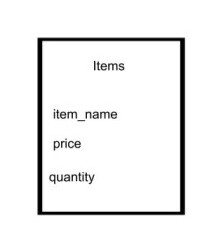
Here are the steps for performing the task as described before.
- Install the Django Rest framework using the following command
pip install djangorestframework
Add the 'rest_framework' to the INSTALLED_APPS setting in settings.py, follow these steps:
Open the settings.py file.
Locate the INSTALLED_APPS list.
Add 'rest_framework' to the list of installed apps.
Also, add your app to the list. You can create the app using the following command:
python manage.py startapp core
the INSTALLED_APPS must look something like this
INSTALLED_APPS = [
    'django.contrib.admin',
    'django.contrib.auth',
    'django.contrib.contenttypes',
    'django.contrib.sessions',
    'django.contrib.messages',
    'django.contrib.staticfiles',
    'core',
    'rest_framework',

]
- The most important part of this project, creating the model for the item as we discussed below
from django.db import models

class Items(models.Model):
  item_name = models.CharField(max_length=200)
  price = models.IntegerField()
  quantity = models.IntegerField()
  def __str__(self):
    return self.item_name
After the model is created, it's time to create the serializer.
Here, the word "serializer" might sound something different and new.
A serializer in the Django Rest Framework (DRF) is responsible for modifying data, such as a queryset, into a Python data type that can be converted into JSON and other content forms. This data can then be used in front-end, mobile, and different contexts.
Note: The Django serializer also provides deserialization, which modifies the Python data type back into a queryset.
** Create serializers.py file in your app and add the following code
from rest_framework import serializers
from .models import Items
class itemSerializer(serializers.ModelSerializer):
    class Meta:
        model = Items
        fields ='__all__'
- To process user requests and manage interactions, we need to create a view. These views are widely recognized as viewsets.
** Listing
  from django.shortcuts import render
  from rest_framework.decorators import api_view
  from rest_framework.response import Response
  from .serializers import itemSerializer
  from .models import Items

  @api_view(['GET'])
  def itemList(request):
      items = Items.objects.all()
      serializer = itemSerializer(items, many=True)
      return Response(serializer.data)
We will import essential modules, including render from django.shortcuts, as well as api_view and Response from rest_framework.decorators. Also, we need to import the itemSerializer and Items for further processing.
The @api_view(['GET']) decorator is applied to the itemList function, indicating that this view will specifically handle GET requests. This function serves as an endpoint for retrieving a list of items.
We then create an instance of the serializer, named serializer, which takes the items queryset as input and is set to handle multiple items (many=True).
Finally, we respond to the request by returning the serialized data through Response(serializer.data). This response provides a serialized representation of the items that can be easily consumed by front-end applications or other clients.
** Creating
@api_view(['POST'])
def itemCreate(request):
    serializer = itemSerializer(data=request.data)

    if serializer.is_valid():
        serializer.save()

    return Response(serializer.data)
The itemCreate function serves as a handler for POST requests in a web application. When a POST request is received, this function is responsible for processing the request data and creating a new item.
This serializer is responsible for validating and transforming the request data into a format suitable for further processing. The data parameter of the serializer is set to the request data (request.data).
The code then checks if the serialized data is valid by calling the is_valid() method on the serializer.
If the data is valid, the serializer's save() method is invoked and is saved in database.
Finally, a response is generated using the Response() function. The serialized data from the serializer (serializer.data) is included in the response, allowing to receive information that the item has been successfully created.
** Update
@api_view(['POST'])
def itemUpdate(request, pk):
    item = Items.objects.get(id=pk)
    serializer = itemSerializer(instance=item, data=request.data)

    if serializer.is_valid():
        serializer.save()

    return Response(serializer.data)
The function is named itemUpdate and accepts two parameters: request, representing the incoming HTTP request, and pk, which stands for the primary key of the item to be updated.
Inside the function, the code starts by retrieving the specific item object that matches the provided pk value from the Items Imodel using the get method. This ensures that the correct item is targeted for updating.
This serializer is responsible for validating and processing the data to be updated. It takes the retrieved item object and the request.data as its parameters.
The code then checks if the serialized data is valid by calling the is_valid() method on the serializer.
If the data is valid, the serializer's save() method is invoked and is saved in database.
Finally, a response is generated using the Response() function. The serialized data from the serializer (serializer.data) is included in the response, allowing to receive information that the item has been successfully created.
** Delete
@api_view(['DELETE'])
def itemDelete(request, pk):
    item = Items.objects.get(id=pk)
    item.delete()

    return Response('Item succsesfully delete!')
The specific item object is retrieved as described below, and once the object is deleted, the response is sent indicating that the item has been successfully deleted.\
The urls.py for app core is as follows
from django.urls import path
from . import views

urlpatterns = [
    path('itemlist/', views.taskList),
    path('item/create/', views.itemCreate),
    path('item/update/<str:pk>/', views.itemUpdate),
    path('item/delete/<str:pk>/', views.itemDelete ),
]
The urls.py for project is as follows
from django.contrib import admin
from django.urls import path, include

urlpatterns = [
    path('admin/', admin.site.urls),
    path('api/', include('api.urls')),
]
This is the simple way to create CRUD API using Django Rest Framework.

